FlytheWorld

  • Subscribe to our RSS feed.
  • Twitter
  • StumbleUpon
  • Reddit
  • Facebook
  • Digg
Showing posts with label Android. Show all posts

Thursday, September 26, 2013

Great Literary List of Books in Google Play for Free

Posted on 8:05 AM by Unknown

It's an amazing collection of books one must read in their lifetime. Even if you don't have an Android phone, you can read it in the computer browser.

Here is the link: https://play.google.com/store/books/collection/topselling_free


via +lynn paden 
Read More
Posted in Android, books, free, Google Play | No comments

Thursday, March 21, 2013

How to Save Voice Memos in Google Keep via Google Now

Posted on 3:20 PM by Unknown
Open Google Now in Android phones or tablets and click the microphone icon and say "Note" and "the voice message" at the same time like the above example. Once you finish the message you will see the option "Save note", click save, you will see the saved voice message remainder in Google Keep.

For now it works in only Android OS but soon Google Now will be available for iOS, then you can use the similar method.


You can get the Google Keep Android app from the Play store link here: https://play.google.com/store/apps/details?id=com.google.android.keep
Read More
Posted in Android, Android Apps, how to, tips, voice message | No comments

Wednesday, February 20, 2013

SwiftKey 4 Tablet and Smartphone App for Android is $1.99

Posted on 7:10 AM by Unknown

The updated app, SwiftKey 4 has both predictive as well as Swype-like (flow) typing, is currently available on sale in  Google Play at 50% off of the original price. You can download it from the Google Play links below:

SwiftKey 4 Tablet App

SwiftKey 4 Smartphone App


SwiftKey replaces the touchscreen keyboard on your tablet with one that understands how words work together, giving the world’s most accurate autocorrect - and predicting your next word before you press a key.

The keyboard learns as you use it to make corrections and predictions based on the way that you write. It can even learn from your Gmail, Facebook, Twitter or blog to make its insights even more personalized. You can also enable up to three languages simultaneously, for true multi-lingual typing.

Switch seamlessly between tapping and gesture typing with our new SwiftKey Flow feature. It combines the mind-reading capabilities of SwiftKey with the speed of gliding your fingers across the screen. With ‘Flow Through Space’, you can also enter entire phrases without lifting your finger from the screen, simply by sliding to the space bar between words.

Read More
Posted in Android, Android Apps, keyboard, sale, Swiftkey | No comments

Thursday, January 17, 2013

Get 50GB of free cloud storage from MediaFire Android App

Posted on 6:34 AM by Unknown

MediaFire is similar to Dropbox but without syncing option, for now it allows only manual upload option (the sync option will be available soon according to MediaFire rep). 

I think this 50GB cloud storage will be useful down the road. You can download it from Google Play link.
Read More
Posted in Android, Android Apps, Dropbox, free, MediaFire, storage | No comments

Monday, January 14, 2013

How to use Daydream in Android Phones

Posted on 9:42 AM by Unknown
Daydream feature in Android
Flipboard, magazine app for Android, updated its features by including Daydream mode in it. To use this Daydream feature, do the following:

Click Settings in Android (works only in Jelly Bean 4.2 for now) --> Click "Display" settings --> Click "Daydream" --> Choose either "Clock", "Colors", "Google Currents", "Flipboard", "Photo Frame", or, "Photo Table" (Among these only Colors and Google Currents have no further settings) --> Click "Start Now" from the Menu

If you chose Flipboard from the above settings, you will see the Daydream feature with various news updates on the screen.

You can also set Daydream to start when charging or when the device is docked by clicking the "When to Daydream" setting in Menu.

Read More
Posted in Android, Daydream, Flipboard, how to, tips | No comments

Sunday, January 13, 2013

Free TV Episodes for Android Phones and Tablets from Google Play

Posted on 7:07 AM by Unknown
Google Play Screenshot
You can download the episodes of TV shows such as Deception, Once Upon A Time, The Walking Dead etc., for a limited time from Google Play.
Read More
Posted in Android, download, free, Google Play, tv | No comments

Wednesday, January 9, 2013

Copy shareable data to Android clipboard with CTRL+C App

Posted on 7:56 AM by Unknown

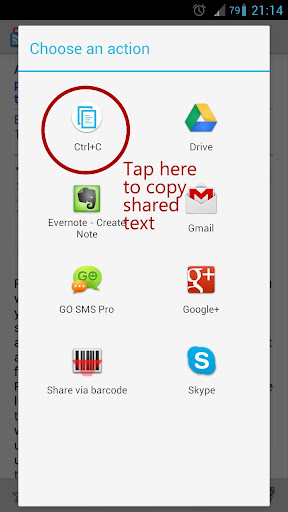
CTRL+C Android app works like any share option only difference it copies the data to clipboard and you can add that date anywhere in mail, text messaging or in documents in Android. It's a useful utility app to have in Android. 

Once you choose the link or text to share, hit the "CTRL+C" option to save the data in clipboard.
Read More
Posted in Android, Android Apps, copy and paste, how to, tips, Utility | No comments

Tuesday, January 1, 2013

How to be more productive or do more tasks with Google Now in Android?

Posted on 2:19 PM by Unknown
The videos below give a good summary of how many different things you can do with Google Now feature in Android phones and Tablets. Even if you do an efficient search with Google Now, watch the videos, it gives you new ways to use Google search.

You can also do bar code scan to find more information about the products and find out the song that is playing the background etc., and more features are being added to it and can get only more powerful with time.

Besides this, Google Now has Cards to update most of the information just below the Google Search window.


Read More
Posted in Android, google, Google Now, Google Search, how to, tips | No comments

Saturday, December 29, 2012

How to add wallpaper from images stored in external source or folders in Android?

Posted on 7:33 AM by Unknown
You can set any images as Wallpaper in Android provided they're stored in the "Pictures" folder in the main settings in Android. But if you want to add images stored in a different folder such as in Dropbox, Box, Google Drive folders, then do the following (in this example, I used images for this blog article from Android Foundry):

1. Open the image you would like to have as wallpaper from any of the sources, Dropbox, Box etc.,
2. Press the image once and you will see different options such as "Favorite", "Share", "Export" etc.,
3. Select the "Export" and choose the option "Save to SD Card" (even without the SD card it refers to internal storage)
4. Go to "Pictures" folder and save the image either in any of the existing folders or in "Wallpapers" folder (if there is no Wallpapers folder, you can create one using "create new folder" option).
5. Save the image in the new folder, here in this example it is stored in "Wallpapers" folder.
6. Go the main screen, press any blank space to see the "Add to Home Screen" options such as "Widgets", "Folders", "Wallpapers". Click the Wallpapers setting.
7. Choose the "Gallery" option and go to the "Wallpapers" folder created in Step 4 and adjust the screen size of this image and click "OK".

You will see something like this screen:


Read More
Posted in Android, how to, mobile, tips, wallpaper | No comments

Wednesday, November 14, 2012

How to use Photo Sphere for Panorama shots in Android Phones or Tablets

Posted on 3:34 PM by Unknown

Google is releasing the new Jelly Bean update 4.2 to most of the new phones, I just received mine in Nexus 7. One of the new features is Photo Sphere, where we can take a panoramic shot by clicking the panorama icon below the main camera button.

Up, down and all around you, it’s like no camera you’ve ever seen. With Android 4.2, snap pictures in every direction that come together into incredible, immersive photo spheres that put you right inside the scene. View your photo spheres right on your phone, share them on Google+ with your friends and family, or even add them to Google Maps for the world to see.
Read More
Posted in Android, how to, panorama, Photo, tips | No comments

Friday, November 2, 2012

Mophie Power Juice pack for the Samsung Galaxy S III

Posted on 7:59 AM by Unknown
siii Mophie Juice Pack Now Available for Samsung Galaxy S III

Previously, Mophie had special power packs for iPhones, now they seem to make them available for Android phones starting with the popular Samsung Galaxy SIII. It is priced at $99 per unit with choice of two color options, Black or White.


Introducing the mophie juice pack (2800 mAh) for the Samsung Galaxy S III. Take full advantage of everything your S III has to offer with this durable, ultra-thin battery case. Enjoy up to 32 extra hours of audio, 8 extra hours of video playback, or 9 extra hours of web browsing without compromising any of your phone’s features.

Learn more at mophie.com/GalaxyS3.

I use Seidio battery pack (3800 mAh) for Galaxy Nexus, which does a similar job priced at $69.99. If you have a different Android phone there are tons of extended battery packs in Amazon. 


Read More
Posted in Android, Batteries, extended battery, iphone, Samsung Galaxy SIII | No comments

Friday, October 26, 2012

Samsung Galaxy Note 2 Android Phone Review

Posted on 2:00 PM by Unknown


Excellent review, it is a long video but if you are planning to purchase watching the video will be a big help.
Read More
Posted in Android, review, Samsung Galaxy Note 2 | No comments

Wednesday, October 17, 2012

How to add credits in Google Play for your Apps, Music purchases

Posted on 4:22 PM by Unknown

If you would rather use credits option like in iTunes, then you can do the same in Google Play store from today (available only for the US users for now). Click the "Buy Google Play Credit" at the bottom of the Google Play store page (as shown above). Once you click the Buy link, you can add different amounts as shown in the picture below.


After the purchase, the amount is added to your Google Wallet and you can access it in "Google Play Balance" to pay for your purchases in Google Play (Apps, Music, Books, Magazines, Videos and Devices). 

This will be a good option to have if you don't want to pay with credit or debit cards in Google Play, just add the amount to your Google Play credit one time accessing your card. 

If Google adds the Gift option for this it will be good. 
Read More
Posted in Android, credit, Google Play, how to, tips | No comments

Monday, October 15, 2012

Ovo Timer - Best Stop watch or timer app for Google Android

Posted on 3:59 PM by Unknown


Ovo Timer works as advertised, is very simple and effective. After you install the app either drag the circle to get the timer set or set the timer via voice (uses Google Voice) to input the time. The timer starts instantaneously after that. After the time is reached, it gives an alarm and a notification. 

Timer like this is very useful to check the time of cooking or time for meditation.

It is a free app you can download it in Google Play. 

Besides Ovo Timer if you want more functions, there are a number of related Stop Watch or Timer apps in Amazon App store and in Google Play.

Read More
Posted in Android, Android Apps, free, Ovo Timer | No comments

Thursday, September 27, 2012

New Outdoors Android app 'Field Trip' from Google

Posted on 11:53 AM by Unknown


Nice app from Google to have when we venture out to new towns and new places. Currently "Field Trip" is available only for Android OS, for others including iOS, it will be released soon.

Field Trip is your guide to the cool, hidden, and unique things in the world around you. It can help you learn about everything from local history to the latest and best places to shop, eat, and have fun. You select the local feeds you like and the information pops up on your phone automatically, as you walk next to those places. Get Field Trip on Android for free.

Download here: https://play.google.com/store/apps/details?id=com.nianticproject.scout
Read More
Posted in Android, Android Apps, Field Trip, google, outdoors, travel | No comments

Saturday, September 8, 2012

How to Make Screen Rotate or Change to Landscape Mode in Nexus 7

Posted on 11:45 AM by Unknown
Stunning Display
In the Nexus 7 tablet, the screen doesn't rotate like other Android phones or in iPad or iPhone, it stays only in portrait mode except for a few applications. Only the YouTube videos and few other programs operate in landscape mode automatically (like shown above).

Weather
To make the screen rotate freely, do the following steps:

1. Go to "Settings" at the top of the screen
2. Go to "System" --> "Accessibility"
3. Enable the "Auto-rotate screen" as shown below.

With the above settings you can then rotate your screen anyway you like. There are other paid apps that does this job or some rooting options, but the below method can be used for rooted or not-rooted Nexus 7 with Jelly Bean Android OS.

Read More
Posted in Android, how to, landscape, portrait, screen rotation, tips | No comments

Thursday, September 6, 2012

Best Apps for Google Nexus 7 Tablet?

Posted on 11:51 AM by Unknown


What are the apps do you recommend for the Android Tablet version such as Google Nexus 7 Tablet? I have the following now with Google Play links:

1. Google Currents 

2. Google+ 

3. Pandora 

4. Flipboard 

5. Accuweather 

6. Swiftkey for Tablet 

7. Gojee (for recipes) 

8. Any.do (for task management) 

9. Amazon Kindle 

10. Business Calendar 

11. Google Chrome 

12. Dolphin Browser HD

13. LastPass (for Passwords) 

14. Google Books 

15. Soundhound Pro

16. Vevo

17. OpenTable 

18. Qlocktwo (for clocks) 

19. Peel (for movie recommendations) 

20. RetailMeNot (for coupons) 

Also, check out this link from Android, has apps customized for Tablets:

https://play.google.com/store/apps/collection/promotion_2012_06_22_TabletCertified
Read More
Posted in Android, Android Apps, Android Tablet, Android Tablet Apps, recommendations | No comments

Friday, August 31, 2012

Skinomi TechSkin - Best Screen Protector for Android Phones

Posted on 8:50 AM by Unknown

I've installed a number of screen protectors on devices ranging from Palm T650, Windows Mobile, Sony Clie, Palm Treo, HTC Droid Incredible and now Samsung Galaxy Nexus. The screen protectors were of different qualities and grade but nothing seem to come close as Skinomi TechSkin. It seems to be specially made for the phone in quality and finish.

Skintomi screen protector fits like a glove on the screen with hardly any air bubbles annoyance you will find with other screen protectors and it doesn't take a long time to install either. 

Before you install, remove the battery and the cable, wipe the screen and spray your hands with the solution given in the package. I then sprayed both sides of the screen protector with the solution Skintomi provided and added them to the phone's screen and removed the liquid with the plastic scraper (which is included also). And let the phone dry for a few minutes and then it is ready for use. No more worries about accidental scratches. You can also watch the below video for how to install the screen protector.

It comes with a lifetime warranty also.


Read More
Posted in Android, Galaxy Nexus, how to, screen protector, Skintomi, tips | No comments

Thursday, August 16, 2012

Smart app updates from Google Play Store for Android reduces Apps installation time considerably

Posted on 4:46 PM by Unknown


The Smart app update is a good feature, it updates the Android apps with big file sizes very quickly. I updated the Bible app, Instagram and IMDB all three got updated in less than a minute just like the video above. 

"Normally, when an update to an application comes out, the Play Store downloads it in full, which with large apps and slow connections can get quite painful (think 50MB+ sizes). Smart app updates, announced at an I/O session in June, was the solution. When enabled, only the incremental difference (a.k.a. the delta) between the old and new apks would be sent over the wire, thereby saving huge amounts of data for both Google and Play Store users."

With Smart app updates the installing time is halved almost, without it we will have to reinstall the whole file again. It definitely saves time and our patience.

Update your Google Play store to have this new feature.

Via Android Police.
Read More
Posted in Android, how to, tips, update | No comments

Wednesday, August 15, 2012

Google adds Sound Search for Android

Posted on 8:28 AM by Unknown


If you're using music finders apps like SoundHound or Shazam, then you'll like this new Sound Search Android App from Google. After you download and install this app from Media Fire via Droid-Life.com, you can create a widget for Sound Search as shown above. 

To find the name of the song, just keep the device close to the speaker or near to it and then hit the button in the widget. The app searches the file from the servers in Google and finds the song that is playing, giving an option to purchase from Google Play as shown below.

Currently it works in JellyBean, may or may not work in other Android OS.

Shazam and Soundhound have more features than Google's Sound Search but I like the simplicity, I just want to find the name of the song, the rest can be discovered later.
  i
Read More
Posted in Android, Android Apps, how to, music, Shazam, Sound Search, Soundhound, tips | No comments
Older Posts Home
Subscribe to: Posts (Atom)

Popular Posts

  • A.I.type: Best Keyboard App for Android?
    A.I.type Keyboard maybe the best keyboard app for Android. I am using SwiftKey X Keyboard , which is another great keyboard for Android, b...
  • Trailer: Mission: Impossible - Ghost Protocol
    Mission Impossible 4 is coming to the theaters by end of this year. From the trailer, it seems it is more action packed than the previous s...
  • Ad: Faber Castell Pen - Girl with a Pearl Earring
    A Girl With A Pearl Earring It is a Japanese ad for Faber Castell pen highlighting how good the pen is for drawing portraits. See how the a...
  • Breaking Bad: Be a Blowfish
    From Breaking Bad , TV show, one of the best in the modern television. Season V starts July 15th, 2012. WALTER WHITE Jesse, look at me, you ...
  • How to locate a lost item using Switch Words?
    I used the below Switch-words technique to retrieve lost items more than half-a-dozen times, such as a library book, important bill and head...
  • World Clocks: Analog & Digital Clock Extension for Chrome Browser
    World Clocks is an excellent clock extension for Chrome. It has both digital and analog clock setting and over 400 cities to choose from. Yo...
  • How to remove scratches in a LCD Monitor with Chapstick?
    My friend had a big scratch on her iMac screen and was worried about costs associated with changing the screen, so I tried to find a simple ...
  • $10 Audible.com Voucher from Amazon Local $0.00
    If you like audio books then you can give it a try in Audible.com (owned by Amazon.com) with this $10 free voucher from Amazon local  Click...
  • Shortcuts for Google Voice Actions App in Android
    Voice Actions Android App is like Siri App in iPhones but has been there for a long time in Android phones.Here are some short cuts, you can...
  • Avoid spam calls to your phone with free US National Do Not Call Registry service
    I used to receive lots of annoying calls from telemarketers, with "National Do Not Call Registry" service, I was able to avoid the...

Categories

  • 2-step verification
  • A.I.type
  • Aborigines
  • accounts
  • Acoustic Ruler Pro
  • Acupressure
  • Ad
  • add
  • Adele
  • Adobe
  • Adobe Digital Editions
  • advertisement
  • advertising
  • advice
  • Agumented Reality
  • Alamar
  • alaska
  • allergy
  • Amazon
  • Amazon App Store
  • Amazon Local
  • Andmade Share
  • Android
  • Android Apps
  • Android Jelly Bean
  • Android Market
  • Android Phones
  • Android Tablet
  • Android Tablet Apps
  • animal shelter
  • animated GIF
  • Ant Crusher
  • Any.DO
  • Aoteoroa
  • apple
  • apple fruit
  • Apple iPad
  • Apple slicer
  • applications
  • apps
  • Appsumo
  • Arcus Clouds
  • ARME
  • art
  • article
  • arts
  • assistant
  • asteroid
  • astronomy
  • Audi
  • audio book
  • Audubon
  • Australia
  • Austria
  • automatic
  • Auudible.com
  • Avidemux
  • baby
  • back
  • backache
  • background
  • backup
  • bank account
  • Bank Simple
  • banks
  • basil
  • bathroom
  • Batman
  • Batteries
  • beagles
  • Beatbox
  • Beats By Dre
  • beautiful
  • beer
  • Bejeweled
  • Benjamin Franklin
  • bicycles
  • Bill Gates
  • Bing
  • Bingo
  • BioLite
  • bird feeder
  • birds
  • blank screen
  • block
  • bookmarklet
  • books
  • Bouygues Telecom
  • Box.com
  • brain
  • brand
  • bread
  • bread clips
  • bread twist-tie
  • Breaking Bad
  • breathing
  • Breuggers
  • brewer
  • brightness
  • browser
  • Bruce Lee
  • bullying
  • burning
  • business
  • calculator
  • calendar
  • Calm App
  • Camping
  • CampStove
  • can opener
  • Canada
  • candy
  • car
  • Cardiograph
  • career
  • Carlton Draught
  • Carrier IQ
  • cars
  • case
  • cats
  • CFL
  • chant
  • charger
  • charity
  • Chec
  • chicken
  • chicken wings
  • children
  • China
  • Chinese
  • chips
  • chopsticks
  • Christmas
  • Chrome
  • Chrome Browser
  • Chrome Errors
  • Chrome Extension
  • Chrome Remote Desktop
  • Chromebook
  • Chromebook Pixel
  • Clint Eastwood
  • closed-caption
  • Cloud Print
  • CloudMagic
  • CloudOn
  • clouds
  • Coffee
  • coffee maker
  • coffee making
  • coffee mug
  • Coin Bank
  • cold brewing
  • Coldplay
  • collaboration
  • collection
  • Colorado
  • comments
  • commercial
  • communication
  • comparison
  • compost. how to
  • computer
  • Concrete Blonde
  • contact lens
  • contest
  • control
  • conversion
  • Cooking
  • copy and paste
  • coupons
  • Craftsman
  • craigslist
  • Create Jobs for USA
  • credit
  • credit card
  • CRX
  • CSYS
  • Currency
  • Daydream
  • deals
  • death
  • definition
  • delete
  • desktop
  • detector
  • developers
  • device
  • diary
  • different
  • discount
  • Disney
  • distance
  • diy
  • DNS
  • do
  • Do Share
  • documents
  • DocumentsToGo
  • dogs
  • Dolphin HD
  • donation
  • donotcall
  • download
  • Dr. Dre
  • drain
  • drainage
  • drawing
  • dream
  • drive-in
  • driving
  • Dropbox
  • DVD
  • Dwolla
  • e-commerce
  • Earth
  • Easyvideoembeds
  • ebooks
  • Ecquire
  • edit
  • eggs
  • electric bicycles
  • electromagnetic field detector
  • email
  • embed
  • EMF
  • EMF Hazards Detector
  • Enchantment
  • Energy
  • environment
  • environment tips
  • eReader
  • error
  • Euro 2012
  • EVA
  • Eva Intern
  • events
  • Evernote
  • Evernote Web Clipper
  • exercise
  • extended battery
  • extensions
  • eyeglasses
  • eyes
  • F.lux
  • Faber Castell
  • Facebook
  • fake
  • fashion
  • Fast Flip
  • Fastr
  • fault
  • features
  • feedback
  • Feedly
  • fees
  • Fiat
  • Field Trip
  • file-sharing
  • files
  • film
  • filters
  • finance
  • Financial Times
  • fish
  • Flash
  • flashlight
  • Flipboard
  • flush dns
  • font
  • fonts
  • Football
  • Foster The People
  • France
  • free
  • free. coffee
  • freeware
  • French Press
  • fridge
  • FT Press
  • functions
  • Funny
  • future
  • g.co
  • gadget
  • Galaxy Nexus
  • Galaxy Nexus 7
  • game
  • games
  • garage sales
  • garden
  • Garr Reynolds
  • German
  • Germany
  • Getpunchd
  • Gideon Sundback.
  • GIF
  • gift cards
  • Gilt City
  • gmail
  • GO Power Master
  • google
  • google apps
  • Google Authenticator
  • google calendar
  • Google Chrome
  • Google Chromebook
  • Google Currents
  • google docs
  • Google Doodle
  • Google Drive
  • Google Glass
  • Google Goggles
  • Google Images
  • Google Instant
  • Google Keep
  • google logo
  • google maps
  • Google Music
  • Google Now
  • Google Offers
  • Google Picasa
  • Google Play
  • Google Search
  • Google Translate
  • google translation
  • Google Voice
  • Google Wallet
  • Google+
  • Grammar
  • graph
  • great quotes
  • Groupon
  • Guy Kawasaki
  • Guzheng
  • hacks
  • Halloween
  • handicraft
  • Handsome Furs
  • handwriting
  • Handymate
  • hangouts
  • hard drive
  • Hario V60
  • hazardous
  • headphones
  • health
  • health care
  • heart rate
  • heat
  • Henry Ford
  • herbs
  • highways
  • history
  • Hitler
  • hole punch
  • Home
  • Home Tips
  • HomeStove
  • House of Cards
  • how t
  • how to
  • howto
  • HTML5
  • Hugh MacLeod
  • humble
  • IBM
  • ice
  • ice tray
  • iMac
  • image
  • images
  • Incandescent
  • inferior
  • information
  • innovation
  • input
  • inspiration
  • insurance
  • invention
  • invitation
  • iOnRoad AR
  • iOS
  • iOS apps
  • iPad
  • iPad App
  • iPad2
  • iphone
  • iPhone 4S
  • iPhone Apps
  • ipod
  • Iris
  • Italy
  • iTunes
  • Jack Dyson
  • James Dyson
  • japan
  • Japanese
  • Jawbone
  • Jawbone Up
  • Jerry Weissman
  • Johnnie Walker
  • Juice Defender
  • Julien Smith
  • Kansas City Library
  • Kaspersky
  • Kevin Spacey
  • keyboard
  • keylogging
  • kgbdeals
  • Kickstarter
  • Kien Lam
  • Kindle
  • Kindle Book
  • Kindle Fire
  • Kitchen
  • kitten
  • Kiva.org
  • knife
  • Kristina Tararina
  • Kuhn Rikon
  • Kurt Schneider
  • lamp
  • landscape
  • language
  • laptop
  • Larry Page
  • late
  • launch
  • Launcher Pro
  • Layar
  • leak
  • led
  • LED bulb
  • lego
  • LEGO Bricks
  • library
  • life
  • Linux
  • live wallpaper
  • lizards
  • loans
  • location
  • lock
  • login
  • Logitech
  • LogMeIn
  • logo
  • Lonely Planet
  • Lookout
  • lost
  • lost and found
  • love
  • loyalty cards
  • lyrics
  • Mac
  • Mac OS
  • MacBook
  • Madden
  • magazine
  • Mahjong
  • Mail
  • Maily
  • man
  • manage
  • Management
  • manhole
  • maps
  • marketing
  • Math
  • Mathematics
  • measurements
  • media
  • MediaFire
  • meditation
  • meetings
  • Mega
  • merge
  • Meru Mudra
  • Messi
  • meteor
  • Mexico
  • micro-loans
  • Microsoft
  • Microsoft Office
  • Microsoft SyncToy
  • Mission Impossible
  • mobile
  • MobiLearn
  • Moleskin
  • Moleskine
  • Mona Simpson
  • monitor
  • monopoly
  • Monster
  • moon
  • Mophie Juice Pack
  • movie
  • mp3
  • Mr. Number
  • mudras
  • multi-task
  • music
  • My Chrome Theme
  • National Do Not Call Registry
  • National Geographic
  • national parks
  • Nest
  • Netflix
  • Netherlands
  • new
  • New York Times
  • new zealand
  • NewEgg
  • NFC Chips
  • NFL
  • NFL Pro 2012
  • Nike
  • Nine Inch Nails
  • Norway
  • notebook
  • Obama
  • OCR
  • offer
  • offers
  • Ogilvy
  • online
  • open
  • opener
  • OpenTab
  • Opera Browser
  • opt-out
  • OptOutPrescreen.com
  • Österreich
  • outdoors
  • Ovo Timer
  • packages
  • Page Speed
  • Painting
  • Pandora
  • panorama
  • paper
  • Parcels
  • parents
  • parks
  • password
  • Paulo Coelho
  • payment
  • Paypal
  • PC
  • pdf
  • pens
  • personal
  • Peterson Birds
  • pets
  • Philanthroper
  • phone
  • phone call
  • Photo
  • Photo of the Day
  • photography
  • photos
  • phrase
  • Pictionary
  • pictures
  • piggy-bank
  • pin numbers
  • pineapple
  • pineapple slicer
  • plane
  • plot
  • PlugBug
  • Pocket
  • policy
  • politics
  • polls
  • Porsche 962
  • portable
  • portrait
  • Portugal
  • pose
  • potato
  • power management
  • Powermat
  • pranayama
  • pre-order
  • presentation
  • Presentation Zen
  • President
  • printer
  • problems
  • productivity
  • project
  • Project Glass
  • promotion
  • publishing
  • QR Codes
  • Quickoffice
  • quotes
  • radiation
  • radio
  • radio station
  • Raditaz
  • Ramit Sethi
  • Read It Later
  • recommendations
  • recovery
  • Redbox
  • redeliver
  • reference
  • remedy
  • remote access
  • remote control
  • rentals
  • rescue
  • research
  • resize
  • returns
  • review
  • reward
  • Rich
  • rooted
  • Rösle Apple Slicer
  • Russia
  • sale
  • Sam Tsui
  • sample
  • Samsung
  • Samsung Galaxy Note 2
  • Samsung Galaxy SIII
  • Samuel Silva
  • Sarvangasana
  • Saturday Night Live
  • save
  • savings
  • science
  • scratches
  • screen
  • screen capture
  • screen protector
  • screen rotation
  • Screensaver
  • screenshot
  • search
  • Secret Squirrel
  • security
  • send
  • Send to Kindle
  • Senzari
  • seth godin
  • settings
  • shake
  • share
  • Sharebuilder
  • sharing
  • sharpening
  • Shazam
  • shopping
  • short URL
  • shortcuts
  • shovel
  • show
  • shows
  • Shredder
  • Sidecar
  • sign-in
  • signature
  • SignNow
  • simple
  • Singapore
  • Siri
  • Sirius
  • Skintomi
  • SkyDrive
  • SkySafari
  • slogan
  • small business
  • smartphone
  • smiley
  • sms
  • snacks
  • Snapseed
  • Soccer
  • social
  • software
  • solar
  • Sonalight
  • song
  • sony
  • Sony Music
  • sound
  • Sound Search
  • Soundhound
  • spam
  • Sparrow
  • speakers
  • Speaktoit Assistant
  • speed reading
  • Sports
  • spyware
  • Square
  • squirrel
  • stack
  • Starbucks
  • startup
  • startup screen
  • startups
  • stereo
  • Steve Jobs
  • Stick It
  • stickers
  • storage
  • Story
  • stove
  • street view
  • subscription
  • subtitles
  • success
  • suicide
  • superior
  • Sweden
  • Swedish House Mafia
  • Swiftkey
  • Swingline
  • Switch Words
  • Switzerland
  • sync
  • table-tennis
  • tables
  • tablet
  • talent
  • tasks
  • tea
  • tea leaves
  • TeamViewer
  • technology
  • telemarketers
  • tell
  • temperature
  • Temple Run
  • Tetris
  • TeuxDeux
  • text
  • text messages
  • textbooks
  • Thailand
  • TheBlu
  • themes
  • Thermostat
  • Thesaurus
  • Think Different
  • Tiger Woods
  • tins
  • tips
  • toddy
  • todo
  • toilet
  • Tony Hsieh
  • Tools
  • toothpaste
  • toy
  • tracking
  • Trade
  • trailer
  • translation
  • travel
  • travel guide
  • trial
  • Triposo
  • Tumblr
  • Tutorial
  • tv
  • Twentieth Century Fox
  • Twitter
  • type
  • ugly
  • Ukraine
  • Ukraine Got Talent
  • unique
  • United Kingdom
  • update
  • USA
  • USB
  • USB Hub
  • users
  • USPS
  • Utility
  • video
  • voice
  • Voice Actions
  • Voice Actions Plus
  • voice input
  • voice message
  • voice search
  • Volkswagen
  • wallpaper
  • warning
  • watches
  • Water
  • weather
  • Weather Travel Fashion
  • web design
  • Website
  • weight-loss
  • What We Had
  • Whiskey
  • wildfire
  • Willy Brandt
  • Windows 7
  • Windows Live
  • Windows Live Movie Maker
  • Windows Mobile
  • Windows OS
  • Windows Vista
  • Windows XP
  • windshield
  • wine
  • Wireless
  • wishlist
  • wood
  • word
  • Word Lens
  • word processing
  • World
  • world clock
  • Wörthersee
  • yard sale
  • Yard Sale Mapper
  • yoga
  • youtube
  • Zebra Crossing
  • Zig Ziglar
  • zipper
  • zoom
  • zozi

Blog Archive

  • ▼  2013 (117)
    • ▼  October (1)
      • Word definition gets better in Google Now and in G...
    • ►  September (11)
    • ►  August (5)
    • ►  July (8)
    • ►  June (8)
    • ►  May (11)
    • ►  April (13)
    • ►  March (14)
    • ►  February (21)
    • ►  January (25)
  • ►  2012 (271)
    • ►  December (13)
    • ►  November (17)
    • ►  October (27)
    • ►  September (20)
    • ►  August (22)
    • ►  July (20)
    • ►  June (18)
    • ►  May (27)
    • ►  April (27)
    • ►  March (26)
    • ►  February (22)
    • ►  January (32)
  • ►  2011 (112)
    • ►  December (42)
    • ►  November (34)
    • ►  October (36)
Powered by Blogger.

About Me

Unknown
View my complete profile