FlytheWorld

  • Subscribe to our RSS feed.
  • Twitter
  • StumbleUpon
  • Reddit
  • Facebook
  • Digg
Showing posts with label Google Drive. Show all posts

Thursday, May 23, 2013

Search emails, calendar, documents in Gmail

Posted on 10:33 AM by Unknown


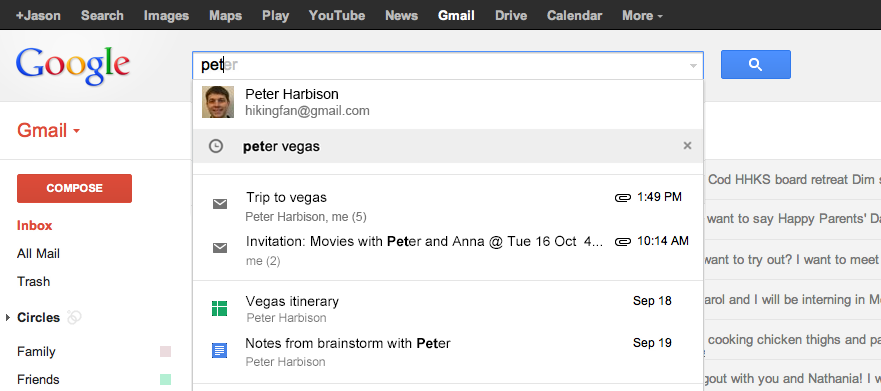
Before we were able to search only the emails in Gmail account, now we can also search calendar, documents within Gmail to find related information.

"As part of field trial we opened in October, it became possible to instantly see your relevant emails, Google Drive files, Calendar events, and more when you search in Gmail. Those of you who participated in the field trial told us that you like the time-saving convenience of searching for all your stuff from one place, and over the coming week, we'll be rolling out this feature in English to all U.S. users. Now you can find what you're looking for faster right in Gmail."

This is similar to what CloudMagic has been doing for years, besides CloudMagic is a better tool searches multiple Gmail accounts, multiple Google App accounts, Twitter, Facebook accounts and more as well. I'm not sure whether Google will have those features for a while.

Read More
Posted in gmail, google calendar, google docs, Google Drive, search | No comments

Tuesday, April 9, 2013

How to add fonts in Google Drive Presentation?

Posted on 6:26 AM by Unknown
One reader asked me how we can add fonts in Presentation, here is a short article about it. Adding fonts in Google Drive Documents is easy, if you know how to add fonts in Google Drive Documents then it is the same process in Google Drive Presentations also.

Click the font menu as shown and click "Add Fonts" to add the new font or fonts.


Once you click "Add Fonts' you will see more than 400 different fonts to choose from, select those you need.


If you want to make these presentation available online, choose a font that everyone can see it, not all fonts are available in their computers.
Read More
Posted in add, fonts, Google Drive, how to, presentation, tips | No comments

Tuesday, December 11, 2012

Save Images, Links with 'Save to Google Drive' Chrome Extension

Posted on 2:34 PM by Unknown

With this new "Save to Google Drive" extension, we can now save images, links directly in Google Drive. It is similar to "Pocket (formerly Read It Later)" but instead of storing in Pocket website, it saves in our Google Drive account.

This extension allow you to save web content directly to Google Drive through a browser action or context menu. You can save documents, images, and HTML5 audio and video all by right clicking and selecting 'Save to Google Drive'. You can save the currently viewed page using the 'Save to Google Drive' browser action. The format of saved HTML pages can be controlled with the options page (Choice of Entire image (default), Visible image, Raw HTML, MHTML, or Google Doc). You can automatically convert Microsoft Office files or comma separated files to Google docs format.

With "Save to Google Drive" extension we can save in two ways, with right-click you can save the image as shown above and by clicking the extension button installed in the menu bar we can save links. Go to chrome://extensions/ and open the options of this extension to choose what format you want to save the article, in image format or in HTML version as shown below). We can also save audio and video files with this extension.


Read More
Posted in browser, google, Google Chrome, Google Drive, how to, images, save, tips | No comments

Tuesday, November 27, 2012

Gmail adds Auto-save feature and Google Drive option to send file sizes upto 10GB

Posted on 11:07 AM by Unknown

This is a great feature to have when we need to send large attachments more than 1GB to others. It is not showing up yet in my Gmail but Google said this will be rolled out to all the users soon in the next few days. 

Have you ever tried to attach a file to an email only to find out it's too large to send? Now with Drive, you can insert files up to 10GB -- 400 times larger than what you can send as a traditional attachment. Also, because you’re sending a file stored in the cloud, all your recipients will have access to the same, most-up-to-date version. Like a smart assistant, Gmail will also double-check that your recipients all have access to any files you’re sending. This works like Gmail’s forgotten attachment detector: whenever you send a file from Drive that isn’t shared with everyone, you’ll be prompted with the option to change the file’s sharing settings without leaving your email. It’ll even work with Drive links pasted directly into emails.

 I also saw another nice feature, "auto-save" feature, whatever we type in the Compose window is stored as a draft message, so we don't have to worry about long messages getting lost by accidental window closing nor we have to click the "save" option anymore. It is just like the auto-save feature in Google Drive there is no save button.


Read More
Posted in email, file-sharing, gmail, Google Drive | No comments

Thursday, May 3, 2012

How to add New Fonts in Google Docs or Google Drive

Posted on 11:27 AM by Unknown


Google Docs added 450 New Fonts and more than 60 Templates in their latest update. Now you can choose more fonts to suit your variety of writing needs compared to what was available before. Still some fonts like Helvetica, and other languages fonts are missing but the above addition is a good start.


To add fonts to your Google Docs, first open an existing file or a new one and click the font menu as shown in the picture above, you will see "Add fonts" at the bottom of the font list. Click the "Add fonts" to see more than 450 new fonts.


Once you finish selecting the fonts, click "Ok", the selected fonts will be added to the font menu.


You can also find fonts based on different styles such as for "Handwriting", "Display" etc., as shown below:


There is no removal button to delete any of the added fonts or delete the existing fonts in the font menu. I hope Google Docs team will add this feature along with adding custom fonts from the computer or from a URL.

Read More
Posted in font, google docs, Google Drive, how to, online, tips | No comments

Tuesday, April 24, 2012

Google Drive is Here

Posted on 10:02 AM by Unknown


It is finally here after a lengthy speculation. To start using Google Drive, go to http://drive.google.com to upgrade to 5GB from 1GB storage.


After that, you will be needing this program to sync with your PC:


https://tools.google.com/dlpage/drive/index.html?pli=1


After you install the Google Drive for PC, you can then select the folders and files you want to sync with the computer.


To increase the storage space from 5GB to 100GB, Google charges $4.99 a month or for even more storage space go to https://www.google.com/settings/storage/?hl=en?


For more information about Google Drive, visit Google Blog.
Read More
Posted in Google Drive, storage | No comments

Monday, April 23, 2012

Upgrade to 25GB space on Skydrive for Free, No Purchases Necessary

Posted on 12:37 PM by Unknown
From


Just log on to your Windows Live (Hotmail) account from this Microsoft SkyDrive storage link and you will see the button at the top of your account page like in the picture above “SkyDrive’s free storage is changing - claim your free 25GB” link. Click that link to upgrade it from the previous storage option 7GB to 25GB. 


There are no requirements for this upgrade, so you can straight away get upgraded it to 25GB storage option in SkyDrive.


After you click the link, you will see four options like the below picture, choose the first one to get upgraded to 25GB for free.


I don’t use SkyDrive that much but still will become handy when we want to send large files later to your friends or contacts.

Google is also planning to launch Google Drive soon. Rounding up other storage options, Box.com has free 50GB option in Android Market and Dropbox has 2GB free storage option.


Read More
Posted in Box.com, Dropbox, free, Google Drive, SkyDrive, storage, Windows Live | No comments
Older Posts Home
Subscribe to: Posts (Atom)

Popular Posts

Categories

  • 2-step verification
  • A.I.type
  • Aborigines
  • accounts
  • Acoustic Ruler Pro
  • Acupressure
  • Ad
  • add
  • Adele
  • Adobe
  • Adobe Digital Editions
  • advertisement
  • advertising
  • advice
  • Agumented Reality
  • Alamar
  • alaska
  • allergy
  • Amazon
  • Amazon App Store
  • Amazon Local
  • Andmade Share
  • Android
  • Android Apps
  • Android Jelly Bean
  • Android Market
  • Android Phones
  • Android Tablet
  • Android Tablet Apps
  • animal shelter
  • animated GIF
  • Ant Crusher
  • Any.DO
  • Aoteoroa
  • apple
  • apple fruit
  • Apple iPad
  • Apple slicer
  • applications
  • apps
  • Appsumo
  • Arcus Clouds
  • ARME
  • art
  • article
  • arts
  • assistant
  • asteroid
  • astronomy
  • Audi
  • audio book
  • Audubon
  • Australia
  • Austria
  • automatic
  • Auudible.com
  • Avidemux
  • baby
  • back
  • backache
  • background
  • backup
  • bank account
  • Bank Simple
  • banks
  • basil
  • bathroom
  • Batman
  • Batteries
  • beagles
  • Beatbox
  • Beats By Dre
  • beautiful
  • beer
  • Bejeweled
  • Benjamin Franklin
  • bicycles
  • Bill Gates
  • Bing
  • Bingo
  • BioLite
  • bird feeder
  • birds
  • blank screen
  • block
  • bookmarklet
  • books
  • Bouygues Telecom
  • Box.com
  • brain
  • brand
  • bread
  • bread clips
  • bread twist-tie
  • Breaking Bad
  • breathing
  • Breuggers
  • brewer
  • brightness
  • browser
  • Bruce Lee
  • bullying
  • burning
  • business
  • calculator
  • calendar
  • Calm App
  • Camping
  • CampStove
  • can opener
  • Canada
  • candy
  • car
  • Cardiograph
  • career
  • Carlton Draught
  • Carrier IQ
  • cars
  • case
  • cats
  • CFL
  • chant
  • charger
  • charity
  • Chec
  • chicken
  • chicken wings
  • children
  • China
  • Chinese
  • chips
  • chopsticks
  • Christmas
  • Chrome
  • Chrome Browser
  • Chrome Errors
  • Chrome Extension
  • Chrome Remote Desktop
  • Chromebook
  • Chromebook Pixel
  • Clint Eastwood
  • closed-caption
  • Cloud Print
  • CloudMagic
  • CloudOn
  • clouds
  • Coffee
  • coffee maker
  • coffee making
  • coffee mug
  • Coin Bank
  • cold brewing
  • Coldplay
  • collaboration
  • collection
  • Colorado
  • comments
  • commercial
  • communication
  • comparison
  • compost. how to
  • computer
  • Concrete Blonde
  • contact lens
  • contest
  • control
  • conversion
  • Cooking
  • copy and paste
  • coupons
  • Craftsman
  • craigslist
  • Create Jobs for USA
  • credit
  • credit card
  • CRX
  • CSYS
  • Currency
  • Daydream
  • deals
  • death
  • definition
  • delete
  • desktop
  • detector
  • developers
  • device
  • diary
  • different
  • discount
  • Disney
  • distance
  • diy
  • DNS
  • do
  • Do Share
  • documents
  • DocumentsToGo
  • dogs
  • Dolphin HD
  • donation
  • donotcall
  • download
  • Dr. Dre
  • drain
  • drainage
  • drawing
  • dream
  • drive-in
  • driving
  • Dropbox
  • DVD
  • Dwolla
  • e-commerce
  • Earth
  • Easyvideoembeds
  • ebooks
  • Ecquire
  • edit
  • eggs
  • electric bicycles
  • electromagnetic field detector
  • email
  • embed
  • EMF
  • EMF Hazards Detector
  • Enchantment
  • Energy
  • environment
  • environment tips
  • eReader
  • error
  • Euro 2012
  • EVA
  • Eva Intern
  • events
  • Evernote
  • Evernote Web Clipper
  • exercise
  • extended battery
  • extensions
  • eyeglasses
  • eyes
  • F.lux
  • Faber Castell
  • Facebook
  • fake
  • fashion
  • Fast Flip
  • Fastr
  • fault
  • features
  • feedback
  • Feedly
  • fees
  • Fiat
  • Field Trip
  • file-sharing
  • files
  • film
  • filters
  • finance
  • Financial Times
  • fish
  • Flash
  • flashlight
  • Flipboard
  • flush dns
  • font
  • fonts
  • Football
  • Foster The People
  • France
  • free
  • free. coffee
  • freeware
  • French Press
  • fridge
  • FT Press
  • functions
  • Funny
  • future
  • g.co
  • gadget
  • Galaxy Nexus
  • Galaxy Nexus 7
  • game
  • games
  • garage sales
  • garden
  • Garr Reynolds
  • German
  • Germany
  • Getpunchd
  • Gideon Sundback.
  • GIF
  • gift cards
  • Gilt City
  • gmail
  • GO Power Master
  • google
  • google apps
  • Google Authenticator
  • google calendar
  • Google Chrome
  • Google Chromebook
  • Google Currents
  • google docs
  • Google Doodle
  • Google Drive
  • Google Glass
  • Google Goggles
  • Google Images
  • Google Instant
  • Google Keep
  • google logo
  • google maps
  • Google Music
  • Google Now
  • Google Offers
  • Google Picasa
  • Google Play
  • Google Search
  • Google Translate
  • google translation
  • Google Voice
  • Google Wallet
  • Google+
  • Grammar
  • graph
  • great quotes
  • Groupon
  • Guy Kawasaki
  • Guzheng
  • hacks
  • Halloween
  • handicraft
  • Handsome Furs
  • handwriting
  • Handymate
  • hangouts
  • hard drive
  • Hario V60
  • hazardous
  • headphones
  • health
  • health care
  • heart rate
  • heat
  • Henry Ford
  • herbs
  • highways
  • history
  • Hitler
  • hole punch
  • Home
  • Home Tips
  • HomeStove
  • House of Cards
  • how t
  • how to
  • howto
  • HTML5
  • Hugh MacLeod
  • humble
  • IBM
  • ice
  • ice tray
  • iMac
  • image
  • images
  • Incandescent
  • inferior
  • information
  • innovation
  • input
  • inspiration
  • insurance
  • invention
  • invitation
  • iOnRoad AR
  • iOS
  • iOS apps
  • iPad
  • iPad App
  • iPad2
  • iphone
  • iPhone 4S
  • iPhone Apps
  • ipod
  • Iris
  • Italy
  • iTunes
  • Jack Dyson
  • James Dyson
  • japan
  • Japanese
  • Jawbone
  • Jawbone Up
  • Jerry Weissman
  • Johnnie Walker
  • Juice Defender
  • Julien Smith
  • Kansas City Library
  • Kaspersky
  • Kevin Spacey
  • keyboard
  • keylogging
  • kgbdeals
  • Kickstarter
  • Kien Lam
  • Kindle
  • Kindle Book
  • Kindle Fire
  • Kitchen
  • kitten
  • Kiva.org
  • knife
  • Kristina Tararina
  • Kuhn Rikon
  • Kurt Schneider
  • lamp
  • landscape
  • language
  • laptop
  • Larry Page
  • late
  • launch
  • Launcher Pro
  • Layar
  • leak
  • led
  • LED bulb
  • lego
  • LEGO Bricks
  • library
  • life
  • Linux
  • live wallpaper
  • lizards
  • loans
  • location
  • lock
  • login
  • Logitech
  • LogMeIn
  • logo
  • Lonely Planet
  • Lookout
  • lost
  • lost and found
  • love
  • loyalty cards
  • lyrics
  • Mac
  • Mac OS
  • MacBook
  • Madden
  • magazine
  • Mahjong
  • Mail
  • Maily
  • man
  • manage
  • Management
  • manhole
  • maps
  • marketing
  • Math
  • Mathematics
  • measurements
  • media
  • MediaFire
  • meditation
  • meetings
  • Mega
  • merge
  • Meru Mudra
  • Messi
  • meteor
  • Mexico
  • micro-loans
  • Microsoft
  • Microsoft Office
  • Microsoft SyncToy
  • Mission Impossible
  • mobile
  • MobiLearn
  • Moleskin
  • Moleskine
  • Mona Simpson
  • monitor
  • monopoly
  • Monster
  • moon
  • Mophie Juice Pack
  • movie
  • mp3
  • Mr. Number
  • mudras
  • multi-task
  • music
  • My Chrome Theme
  • National Do Not Call Registry
  • National Geographic
  • national parks
  • Nest
  • Netflix
  • Netherlands
  • new
  • New York Times
  • new zealand
  • NewEgg
  • NFC Chips
  • NFL
  • NFL Pro 2012
  • Nike
  • Nine Inch Nails
  • Norway
  • notebook
  • Obama
  • OCR
  • offer
  • offers
  • Ogilvy
  • online
  • open
  • opener
  • OpenTab
  • Opera Browser
  • opt-out
  • OptOutPrescreen.com
  • Österreich
  • outdoors
  • Ovo Timer
  • packages
  • Page Speed
  • Painting
  • Pandora
  • panorama
  • paper
  • Parcels
  • parents
  • parks
  • password
  • Paulo Coelho
  • payment
  • Paypal
  • PC
  • pdf
  • pens
  • personal
  • Peterson Birds
  • pets
  • Philanthroper
  • phone
  • phone call
  • Photo
  • Photo of the Day
  • photography
  • photos
  • phrase
  • Pictionary
  • pictures
  • piggy-bank
  • pin numbers
  • pineapple
  • pineapple slicer
  • plane
  • plot
  • PlugBug
  • Pocket
  • policy
  • politics
  • polls
  • Porsche 962
  • portable
  • portrait
  • Portugal
  • pose
  • potato
  • power management
  • Powermat
  • pranayama
  • pre-order
  • presentation
  • Presentation Zen
  • President
  • printer
  • problems
  • productivity
  • project
  • Project Glass
  • promotion
  • publishing
  • QR Codes
  • Quickoffice
  • quotes
  • radiation
  • radio
  • radio station
  • Raditaz
  • Ramit Sethi
  • Read It Later
  • recommendations
  • recovery
  • Redbox
  • redeliver
  • reference
  • remedy
  • remote access
  • remote control
  • rentals
  • rescue
  • research
  • resize
  • returns
  • review
  • reward
  • Rich
  • rooted
  • Rösle Apple Slicer
  • Russia
  • sale
  • Sam Tsui
  • sample
  • Samsung
  • Samsung Galaxy Note 2
  • Samsung Galaxy SIII
  • Samuel Silva
  • Sarvangasana
  • Saturday Night Live
  • save
  • savings
  • science
  • scratches
  • screen
  • screen capture
  • screen protector
  • screen rotation
  • Screensaver
  • screenshot
  • search
  • Secret Squirrel
  • security
  • send
  • Send to Kindle
  • Senzari
  • seth godin
  • settings
  • shake
  • share
  • Sharebuilder
  • sharing
  • sharpening
  • Shazam
  • shopping
  • short URL
  • shortcuts
  • shovel
  • show
  • shows
  • Shredder
  • Sidecar
  • sign-in
  • signature
  • SignNow
  • simple
  • Singapore
  • Siri
  • Sirius
  • Skintomi
  • SkyDrive
  • SkySafari
  • slogan
  • small business
  • smartphone
  • smiley
  • sms
  • snacks
  • Snapseed
  • Soccer
  • social
  • software
  • solar
  • Sonalight
  • song
  • sony
  • Sony Music
  • sound
  • Sound Search
  • Soundhound
  • spam
  • Sparrow
  • speakers
  • Speaktoit Assistant
  • speed reading
  • Sports
  • spyware
  • Square
  • squirrel
  • stack
  • Starbucks
  • startup
  • startup screen
  • startups
  • stereo
  • Steve Jobs
  • Stick It
  • stickers
  • storage
  • Story
  • stove
  • street view
  • subscription
  • subtitles
  • success
  • suicide
  • superior
  • Sweden
  • Swedish House Mafia
  • Swiftkey
  • Swingline
  • Switch Words
  • Switzerland
  • sync
  • table-tennis
  • tables
  • tablet
  • talent
  • tasks
  • tea
  • tea leaves
  • TeamViewer
  • technology
  • telemarketers
  • tell
  • temperature
  • Temple Run
  • Tetris
  • TeuxDeux
  • text
  • text messages
  • textbooks
  • Thailand
  • TheBlu
  • themes
  • Thermostat
  • Thesaurus
  • Think Different
  • Tiger Woods
  • tins
  • tips
  • toddy
  • todo
  • toilet
  • Tony Hsieh
  • Tools
  • toothpaste
  • toy
  • tracking
  • Trade
  • trailer
  • translation
  • travel
  • travel guide
  • trial
  • Triposo
  • Tumblr
  • Tutorial
  • tv
  • Twentieth Century Fox
  • Twitter
  • type
  • ugly
  • Ukraine
  • Ukraine Got Talent
  • unique
  • United Kingdom
  • update
  • USA
  • USB
  • USB Hub
  • users
  • USPS
  • Utility
  • video
  • voice
  • Voice Actions
  • Voice Actions Plus
  • voice input
  • voice message
  • voice search
  • Volkswagen
  • wallpaper
  • warning
  • watches
  • Water
  • weather
  • Weather Travel Fashion
  • web design
  • Website
  • weight-loss
  • What We Had
  • Whiskey
  • wildfire
  • Willy Brandt
  • Windows 7
  • Windows Live
  • Windows Live Movie Maker
  • Windows Mobile
  • Windows OS
  • Windows Vista
  • Windows XP
  • windshield
  • wine
  • Wireless
  • wishlist
  • wood
  • word
  • Word Lens
  • word processing
  • World
  • world clock
  • Wörthersee
  • yard sale
  • Yard Sale Mapper
  • yoga
  • youtube
  • Zebra Crossing
  • Zig Ziglar
  • zipper
  • zoom
  • zozi

Blog Archive

  • ▼  2013 (117)
    • ▼  October (1)
      • Word definition gets better in Google Now and in G...
    • ►  September (11)
    • ►  August (5)
    • ►  July (8)
    • ►  June (8)
    • ►  May (11)
    • ►  April (13)
    • ►  March (14)
    • ►  February (21)
    • ►  January (25)
  • ►  2012 (271)
    • ►  December (13)
    • ►  November (17)
    • ►  October (27)
    • ►  September (20)
    • ►  August (22)
    • ►  July (20)
    • ►  June (18)
    • ►  May (27)
    • ►  April (27)
    • ►  March (26)
    • ►  February (22)
    • ►  January (32)
  • ►  2011 (112)
    • ►  December (42)
    • ►  November (34)
    • ►  October (36)
Powered by Blogger.

About Me

Unknown
View my complete profile