I saw this free offer in Amazon, if you like Chinese game Mahjong, then you will love this Android Game app, "Mahjong Artifacts". It is free today in Amazon, the game is normally priced at $4.99 and has 4+ ratings.
Sunday, February 19, 2012
'Mahjong Artifacts' Android Game App Free in Amazon
Posted on 1:31 PM by Unknown
I saw this free offer in Amazon, if you like Chinese game Mahjong, then you will love this Android Game app, "Mahjong Artifacts". It is free today in Amazon, the game is normally priced at $4.99 and has 4+ ratings.
Friday, February 17, 2012
Clear App - a 'To Do' productivity app for iPhone & iPad
Posted on 7:43 AM by Unknown
Clear app is a nicely designed and an easy to do app for iPhone and iPad. You can add or remove or group tasks easily with pinch and swipe strokes. It costs $0.99 only in iTunes. The app has various shades of colors to show the degree of importance of the tasks.
The disadvantage though it doesn't sync with Google Tasks or other Calendars, may be they will add this feature in their future versions.
Check also another great To Do app for iOS, TeuxDeux.
Clear is available only for iOS but if you need to use a similar app for Android phones, you can try Any.do (free), which does the above things plus it syncs (manually) with Google Tasks.
Wednesday, February 15, 2012
Send Documents from PC to Kindle Reader or Kindle App
Posted on 5:34 AM by Unknown
This "Send to Kindle" feature was introduced a few months ago but the documents were restricted to be sent to Kindle Reader only, it didn't allow to be read in your Kindle apps in smartphone or tablets. Now, Amazon has added this new feature, where you can send documents to any Kindle app, be in a Smartphone (Android or iOS) or in a Tablet (Android Tablets or iPad).
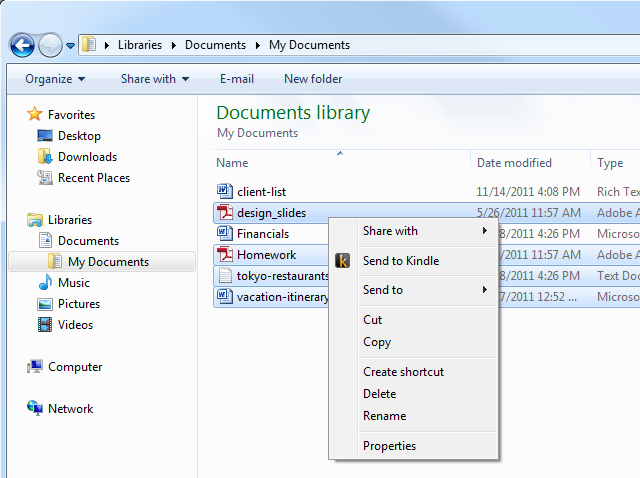
I tried this feature today and I was able to send documents easily. We can send it either from the folder option by right clicking the mouse and choosing "Send to Kindle" or use the print function in documents and selecting "Send to Kindle" as shown in the below images:

Send Documents to Kindle from Folders.

Send Documents to Kindle from Application.
To do this, download the main application from Amazon from this link and select the document you want to send to your Kindle from either the folders or from the Word or other applications. Once you click the "Send to Kindle", you will be given an option to which app you want to send the documents to whether to your Smartphone, laptop or Tablets. Once you select that the document will download in the background and you can see that document in the "Docs" section in the Kindle app.
Posted in Amazon, applications, apps, documents, how to, Kindle, send, Send to Kindle, tips
|
No comments
Monday, February 13, 2012
MIT Offers Free Online Course 'Circuits and Electronics'
Posted on 2:42 AM by Unknown
MITx 6.002 "Circuits and Electronics" course will run from March 5, 2012 to June 8, 2012 and is available for free for everyone. Here is an introduction for the course, MITX 6.002.
MITx 6.002
MITx 6.002
Sunday, February 12, 2012
Avoid getting hands dirty with Chopsticks when eating snacks
Posted on 6:44 PM by Unknown
If you eat cheetos, tortilla chips or corn chips, your hands quickly get colored with stains, there is an easier way though according to Lifehacker.com. In the video in YouTube, Hiu Yau shows how to use chopsticks to eat snacks. Once you master this technique, you can eat other Chinese, Japanese and Korean foods easily.
Here is another video showing how to use chopsticks.
Via Lifehacker.com.
Saturday, February 11, 2012
Music: Joey Fehrenbach | Behold
Posted on 3:47 PM by Unknown
Nice instrumental "Behold" from Joey Fehrenbach you can listen to while you work on other things.
How to Protect your Payments with Google Wallet
Posted on 11:13 AM by Unknown
Google Wallet in Android phones was recently compromised by hackers, so Google is giving the following suggestions to prevent your payment cards from getting accessed by others.
1. If you are using a rooted phone, make sure you don't install Google Wallet, because it is unprotected in that OS version. In phones that Google Wallet can be used usually with Android 4.0 or higher, there is a face lock option and a pin password before you can access the payment card, in rooted phones there are no such options. Though the hackers can only access your pre-paid card option with Google, not your credit or debit cards in the wallet.
2. If you are not using a rooted phone, don't use Google Wallet yet, Google will issue a protected version soon to overcome this flaw. Google's response for this problem: "For example, to address an issue that could have allowed unauthorized use of an existing prepaid card balance if someone recovered a lost phone without a screen lock, tonight we temporarily disabled provisioning of prepaid cards. We took this step as a precaution until we issue a permanent fix soon."If you still have concerns or any concern in the future, you can contact Google Wallet support at this link.
Protecting your payments with Google Wallet
Subscribe to:
Posts (Atom)